

IFC+SG Configuration
The IFC+SG validation set is derived from BCA’s Excel mapping file.
It is broken down into separate disciplines for easier management. However, you can still select all of them if needed.
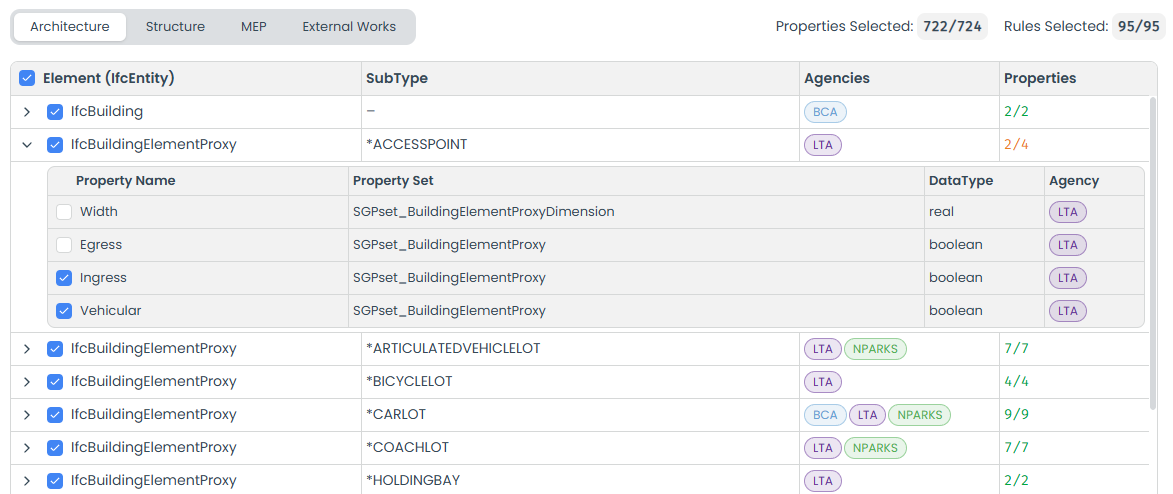
Each property is grouped by its corresponding IFCELEMENT (IfcEntity), giving you fine-grained control to select individual properties by expanding each group.
Checking Methodology
The validation checks for the following criteria:
- Property Name: The property name must match exactly.
- Property Set: The property name must belong to the correct property set.
- Data Type: The data type must match. We simplify the data types into the following categories:
- real: The value should be a real number.
- boolean: The value should be either
trueorfalse. - label: The value should be a string.
- If the datatype in the mapping file call for
areaorlength, we treat it asreal.
- Accepted Values: If the mapping file specifies accepted values, the property value must be one of them.
Failing to meet either of these criteria will result in a validation failure for that element.
Customization
Unlike rules and templates, you can’t customize this set beyond selecting or deselecting items. We keep it up to date and in sync with BCA’s latest requirements.
If you need to check for additional properties, you can create your own rules and include them during validation.
Discrepancies
Since the validation set is derived from BCA’s Excel mapping file. We may make small adjustments (such as, fixing typos or filling missing values) to ensure it works correctly. We cross-check with BCA’s official documentation to ensure accuracy. If you find further discrepancies, please reach out to us.